Steampunk Gear Frame SVG Bundle: A Practical Guide for Creators
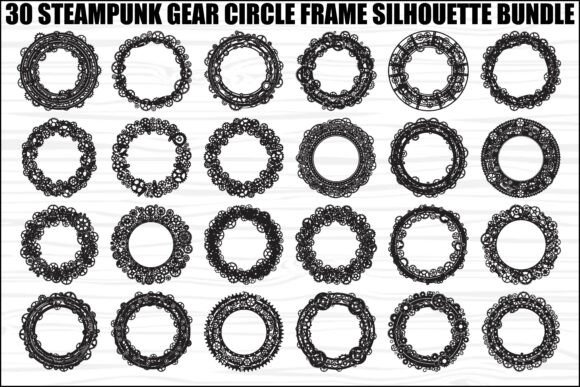
The Steampunk Gear Frame SVG Bundle offers a distinct aesthetic that blends Victorian elegance with industrial machinery. This collection features thirty intricate designs where gears, cogs, bolts, and mechanical elements are arranged into decorative circular frames. For makers looking to add a touch of vintage innovation to their projects, these vector graphics provide a versatile foundation. Whether you are designing t-shirts, creating wall art, or crafting vinyl decals, the balance and symmetry of these circular frames can elevate your work significantly.
However, simply downloading a bundle does not guarantee professional results. Many creators overlook critical details regarding file formats, machine settings, and design application, leading to wasted materials and frustration. Understanding how to properly utilize this specific bundle is essential for achieving clean cuts and high-quality prints.
Understanding the Value of Vector Graphics in Craft
Before diving into usage, it is important to recognize why the format matters. The Steampunk Gear Frame SVG Bundle includes scalable vector files like SVG, EPS, and AI, alongside raster formats such as PNG and JPG. Vectors are defined by mathematical equations rather than pixels, meaning they remain crisp at any size. This is crucial when scaling a small gear design up to a large banner or shrinking it down for a tiny button.
A common misunderstanding among beginners is assuming that all image files are created equal. If you attempt to scale a low-resolution JPG from this bundle to a large size, the image will become pixelated and blurry. In contrast, the SVG and EPS files included ensure that every cog and bolt remains sharp, regardless of the output size. This distinction directly impacts the perceived quality of your final product, especially for clients who expect professional-grade merchandise.
Common Mistakes When Preparing Files for Cutting Machines
One of the most frequent errors occurs during the preparation phase for machines like Cricut or Silhouette Cameo. Users often import the SVG file without checking if the layers are organized correctly. Complex designs like those in this bundle contain multiple overlapping elements—gears within gears, bolts crossing paths. If these layers are not separated or "ungrouped" properly, the cutting tool may struggle to navigate the intricate paths, resulting in incomplete cuts or damaged blades.
Another overlooked detail is the handling of transparent backgrounds. While the bundle includes 30 PNG files with transparent backgrounds, using these for laser cutting or vinyl weeding can be problematic. Raster images do not provide the clean vector paths required for precision cutting tools. Attempting to cut a PNG often forces the software to trace the edges, which can introduce jagged lines or misalignment. To avoid this, always prioritize the SVG or DXF equivalents for cutting applications, reserving PNGs strictly for digital mockups or printing on flat surfaces.
Material Selection and Design Complexity
The intricate nature of the mechanical elements in this bundle requires careful consideration of the material being used. Fine details, such as small bolts or thin gear teeth, may not translate well to certain substrates. For instance, applying a highly detailed gear frame to a textured fabric like denim can cause the vinyl to fail to adhere in the tight crevices, leading to peeling or lifting over time.
Similarly, when using laser cutters, the thickness of the material plays a vital role. A design that looks perfect on paper might collapse or burn unevenly on thick acrylic if the kerf (the width of the cut) is not accounted for. It is advisable to test a single design on scrap material before committing to a full batch. Adjusting the power and speed settings based on the complexity of the gear arrangement ensures that delicate parts do not snap off during the cutting process.
Evaluating File Formats for Specific Projects
The bundle provides a comprehensive list of formats including PDF, AI, and JPG, but each serves a different purpose. Choosing the wrong format for your workflow can lead to unnecessary conversion steps or compatibility issues.
- SVG and EPS: These are your primary choices for cutting machines and professional vector editing software. They offer the best scalability and path definition.
- AI (Adobe Illustrator): Ideal for users who need to edit individual components, such as changing the color of a specific cog or resizing a bolt independently.
- PNG and JPG: Best suited for digital use, such as social media posts, website banners, or printing on mugs where vector paths are not required.
- PDF: Useful for sending files to professional print shops that require high-resolution, non-editable documents.
Misusing these formats can affect efficiency. For example, trying to edit a JPG in a vector program will result in a flattened image that cannot be manipulated. Conversely, sending an AI file to a printer that only accepts PDFs may cause rejection. Always verify the requirements of your production method before selecting the file type.
Strategic Application in Design Projects
To maximize the potential of the Steampunk Gear Frame SVG Bundle, consider the context of your project. These circular frames are excellent for framing text, logos, or central imagery. However, overcrowding the design can diminish its impact. A common mistake is filling every inch of the circle with additional elements, which obscures the mechanical beauty of the original gear structure.
A better approach is to use the negative space effectively. Allow the intricate details of the cogs and bolts to breathe. When creating t-shirts, place the frame around a central graphic or leave the center open for a bold slogan. For wall art, layering the frame over a contrasting background can highlight the depth of the design. Remember that the symbol of gears represents innovation and progress; the design should reflect clarity and movement rather than clutter.
Final Checks Before Purchase and Use
Before integrating this bundle into your business or hobby workflow, perform a few due diligence checks. First, ensure your software supports the specific versions of the vector files provided. Older versions of design programs might struggle with complex nodes found in modern SVGs. Second, download a sample file if available to test the cut quality on your specific machine. This simple step can save hours of troubleshooting later.
Finally, review the license terms associated with the bundle. While many bundles allow for commercial use, there may be restrictions on reselling the raw files themselves. Understanding these boundaries protects your business from legal issues and ensures ethical use of the creative assets.
By avoiding these common pitfalls and leveraging the strengths of the Steampunk Gear Frame SVG Bundle, you can produce high-quality, professional results. Whether you are a beginner exploring DIY crafts or an entrepreneur launching a new product line, attention to detail in file management and material selection will define the success of your steampunk-themed creations.