Beach Umbrella Silhouette Bundle: A Practical Guide for Creators
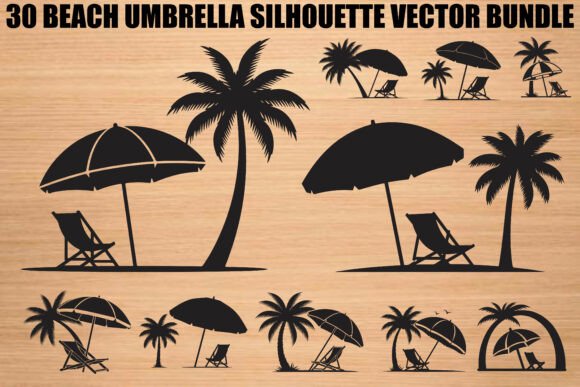
Summer-themed design projects often suffer from a lack of cohesive visual identity. Whether you are creating invitations for a beach wedding, designing vinyl decals for a small business, or crafting personalized gifts, the quality of your source assets dictates the final outcome. The Beach Umbrella Silhouette Bundle offers a curated collection of thirty tropical designs that blend coastal relaxation with artistic detail. However, simply downloading these files is not enough to guarantee professional results. Many creators overlook critical technical and aesthetic considerations when integrating vector artwork into their workflows, leading to wasted materials and subpar products.
Understanding the Value of Clean Vector Artwork
This bundle includes palm trees, umbrellas, and lounge chairs, all rendered as clean, scalable vector graphics. For those unfamiliar with digital design, it is essential to understand why format matters. Unlike raster images (like standard photos), vectors use mathematical paths to define shapes. This means they can be scaled infinitely without losing quality. The included SVG, EPS, AI, and PDF files ensure that whether you are printing a large wall poster or cutting a tiny sticker, the edges remain crisp.
Many beginners make the mistake of relying solely on the PNG or JPG files provided in such bundles. While these high-resolution transparent background images are useful for web graphics or sublimation printing, they are unsuitable for laser cutting or vinyl plotting. Using a pixel-based image for cutting machines forces the software to guess the edges, resulting in jagged cuts and wasted vinyl. Always prioritize the vector formats—SVG for Cricut and Silhouette Cameo users, and AI or EPS for professional graphic design software—to maintain efficiency and precision.
Common Mistakes in Material Selection and Application
One frequent error involves mismatching the design complexity with the chosen material. The silhouettes in this bundle feature intricate details, such as the fronds of palm trees and the ribs of beach umbrellas. While visually appealing, these fine lines can be challenging to weed if cut from low-quality adhesive vinyl. If you are new to crafting, do not assume that any vinyl will work. Cheap, brittle vinyl often tears during the weeding process, especially around the delicate points of a silhouette.
To avoid this, test your cuts on a small section first. Adjust your machine’s pressure settings to ensure a clean cut without cutting through the backing paper. For complex designs like the lounge chair silhouettes, consider using transfer tape with a grid pattern to help align the multiple pieces accurately. This small step prevents frustration and ensures that your final application looks intentional rather than haphazard.
Overlooking Color Psychology and Context
Another overlooked aspect is the contextual use of black silhouettes. By default, these files are often black, which works well for stark, modern contrasts. However, beach themes inherently evoke warmth, light, and vibrancy. Applying a solid black umbrella silhouette to a pastel blue invitation might feel heavy or out of place. Designers should experiment with color overlays in their software before committing to a cut.
For example, if you are creating boho artwork for home décor, consider using earthy tones like terracotta, sage green, or sandy beige instead of traditional black. The vector nature of the files allows you to change colors instantly. This flexibility is crucial for branding consistency. If you are designing logos for a coastal business, ensure the silhouette aligns with the brand’s existing color palette. A mismatched aesthetic can confuse customers and dilute brand recognition.
File Management and Organization Errors
When you download a comprehensive package like this, which includes thirty SVG, PNG, JPG, PDF, EPS, and AI files, disorganization can quickly become a bottleneck. Many creators dump all files into a single folder, making it difficult to locate specific assets later. This inefficiency slows down project turnaround times, especially for freelancers managing multiple clients.
Adopt a systematic filing structure immediately after download. Create separate folders for each file type or, better yet, organize by design theme if the bundle permits. Name your files descriptively. Instead of "image01.svg," rename it to "palm-tree-silhouette-left.svg." This practice saves hours of searching and reduces the risk of using the wrong version of a design. Additionally, keep a backup of the original zip file in cloud storage. Local hard drives fail, and losing access to your core asset library can halt your business operations.
Ignoring Licensing and Usage Rights
Perhaps the most critical mistake involves assuming unlimited commercial rights without verification. While many bundles allow for personal and small-scale commercial use, restrictions often apply to mass production or resale of the digital files themselves. You cannot sell the SVG files as standalone products; you must incorporate them into a physical end product like a t-shirt, mug, or wall art.
Always read the license agreement included in the download. If you plan to sell thousands of units, check if there is a cap on the number of physical items you can produce. Ignoring these terms can lead to legal issues and account suspensions on platforms like Etsy or Amazon Handmade. Transparency with your customers about the handmade nature of your products also builds trust and aligns with ethical business practices.
Maximizing Versatility Across Platforms
The true power of this bundle lies in its versatility. Do not limit yourself to one type of project. The same umbrella silhouette can be used for a summer party invitation, a laser-cut wooden sign, and a sublimated mug. However, each medium requires different preparation. For laser cutting, ensure your SVG paths are closed and free of overlapping lines to prevent burning errors. For sublimation, mirror your image before printing and use high-quality PNGs at 300 DPI to avoid pixelation.
Experiment with layering. Combine the umbrella silhouette with other elements from the bundle, such as palm trees, to create depth. Use opacity adjustments in your design software to create shadow effects, giving a flat silhouette a three-dimensional appearance. This technique elevates simple crafts into sophisticated décor pieces that command higher prices in the marketplace.
Final Checks Before Production
Before sending any design to your cutter or printer, perform a final review. Zoom in to 400% to check for stray anchor points or open paths in the vector file. Ensure that all elements are grouped correctly if they need to move together. Verify the dimensions against your physical material size to avoid scaling errors. These minor checks take seconds but prevent costly mistakes.
The Beach Umbrella Silhouette Bundle provides a strong foundation for creative projects, but success depends on how you apply these tools. By understanding file formats, respecting material limitations, organizing your workflow, and adhering to licensing terms, you can transform simple digital assets into high-quality, marketable products. Approach each project with attention to detail, and let the coastal vibes of these designs enhance your creative expression without compromising professional standards.